Latest News

Showing posts with label WhatsApp. Show all posts
WhatsApp is a great app. It is fast, easy to use and a convenient to stay in touch with people now that almost everyone uses it.
But of late, WhatsApp has added a number of features that makes it a privacy risk. If you are not careful, it is even easy to figure out your daily moment and activity from the information that is displayed on your WhatsApp profile. In some cases, a person doesn't even have to chat with you. All he or she needs to stalk to you is your phone number.
So how do you ward off the stalkers and weirdos or just plain irritants? Well, there are some very simple steps:
-- Start blocking people: We are sure you already know this but it is worth repeating: block numbers of people who are irritating you. To block a contact, open the chat window for that particular contact, tap on the "three dots" on the top right, select "more" and select "block". If you think the person deserves forgiveness, you can unblock him or her later.
-- Hide you profile photo: On WhatsApp anyone can see your profile photo. To change this click on the "three dots" in the main WhatsApp  window and select "settings". In the next window, select "account" and then "privacy".
In the section "Who can see my personal info", select "Profile photo" and set the setting to "Nobody" if you are really paranoid or annoyed at strangers complimenting you, or "my contacts" if you don't mind some of your friends seeing your profile photo from time to time.
-- Turn off last seen: Hiding "last seen" is one single biggest step you can take to safeguard your privacy on WhatsApp. In the same, "Who can see my personal info", select "Last seen" and then choose the option that you want.
-- Similarly, you can also hide status message from strangers or from everyone. Though if you want to hide it from everyone, you can just use a blank status message. That will do the same thing.
-- Turn off Blue Ticks: A few months ago, WhatsApp added this read receipt feature which shows a user when the message has been read by turning the two grey ticks to blue. While it is a useful feature, it also takes away a bit of freedom you have in how and when you respond to messages from others. Once you have seen a message and once the sender of that message knows it, there is an obvious pressure on you to respond.
To turn off the Blue Ticks feature, go to section "Messaging" in the Privacy window. Clear the "Read receipt" selection or in other words uncheck it.
What if you are using an iPhone
The above mentioned tips are for WhatsApp on Android. But what if you are using it on an iPhone? Well, in that case you can access the privacy settings by clicking on the gearwheel placed on the bottom right of the WhatsApp window.
However, on iPhone it seems WhatsApp doesn't allow turning off the blue ticks. It can be done but then for that you have to "jailbreak" the iPhone. But you can change other settings.

Rani Indian Girl Mobile Number for Online dating

desi_indians__709x906
First Name:     Rani
Last Name:     patel
Gender:     Female
Age:     23 Years
Religion:     Hindu
Marital Status:     Single
Date of Birth:     23.05.1981
Language:     Telgu,Hindi,English
Occupation:     Model
Mobile Number:
+91-95-48282571
Company:     Vodafone
Address:     Mizoram ayer
City/State:     Mizoram
Country:     India

Sonia Gotam Indian Hot Girls Number For Friendship


hot indian girls number
Name: Sonia Gotam
Gender: Female
Location: Chennai
Mobile Number:+919435033607
 

Raksha Indian Girl Mobile Number for Online dating


2012017_orig
First Name:     Raksha
Last Name:     patel
Gender:     Female
Age:     23 Years
Religion:     Hindu
Marital Status:     Single
Date of Birth:     23.05.1981
Language:     Telgu,Hindi,English
Occupation:     Model
Mobile Number:
+91-95-48282571
Company:     Vodafone
Address:     Mizoram ayer
City/State:     Mizoram
Country:     India

Indian Girl Kamali WhatsaApp Number


480544_209133025873731_1413166187_n

First Name:     Kamali
Last Name:     Iyer
Gender:     Female
Age:     22 Years
Religion:     Hindu
Marital Status:     Single
Date of Birth:     23.05.1981
Language:     Tamil,Hindi,English
Occupation:     Model
Mobile Number:     +91-95-44157845
Company:     Vodafone
Address:     Mizoram ayer
City/State:     Mizoram
Country:     India
Email Address:


Prachi Indian Girl Mobile Number for Online dating


550576_438482306188626_1189781107_n1
First Name:     Prachi
Last Name:     patel
Gender:     Female
Age:     23 Years
Religion:     Hindu
Marital Status:     Single
Date of Birth:     23.05.1981
Language:     Telgu,Hindi,English
Occupation:     Model
Mobile Number:
+91-95-48284817
Company:     Vodafone
Address:     Mizoram ayer
City/State:     Mizoram
Country:     India


Leena Bonjani Hot indian Girls Mobile Number
Sonia pakistani  girl lahore on WhatsaApp
Kashish Thakur Indian Girl WhatsApp Mobile number
WhatApp No of  Beautiful Girl Gulnaaz Bikhari From Pakistan Lahore
Hina Rabani Mobile Number & Profile From Rawalpindi
Badiyah – Pakistani Karachi Sindhi Girl Number
Iqra Khan ,Desi Beautiful Hot pakistani girl Mobile WhatsApp upload
How to Chat facebook girls on WhatsApp
Mardan Girls Mobile Numbers For Friendship on WhatsApp
WhatsApp Frienship With Desi Kuri Mahem
Anila Khan Mobile Number
Pakistani Girl Samra free mobile numbers
Maham Posing for a photo, WhatsApp leaked
Pakistani Girl Mishmmil Eeman Mobile Number And Pictures
Friendship With Saira Nadeem From Karachi
Mishal Ali From Islamabad
Princess Saba ,Real Girl on Facebook, Get her Facebook Profile Link
Friendship With Beautiful Girl Sania
Hot Nida Hashmi Pakistani Girl Mobile Number And Picture
Dashing Parisha | WhatsApp Number and FB Friendship
Natasha Jadoon ,Real facebook Girls
Huram Sultan | WhatsApp and facebook Profile Link
Nasreena Anam WhatsApp  Mobile Number From Islamabad
Rubab Ali
Friendship With Sana From Pakistan Lahore
Mishi Farhan from UK (Expatriate)
Faiza Aslam Pakistani Girls WhatsApp Mobile Number
WhatsApp  Dating With Desi Girl Zenish Live In USA
Pakistani girls Sundas free mobile number Gujranwala
Saira From Islamabad Moile Number And Picture
Friendship With Lara Jesy From Canada
WhatsApp Friendship With Desi Girl Anum Mehar From Canada
Hot Girl Sana Rajput Mobile Number From Lahore, Pakistan
Chat facebook girls on WhatsApp
Friendship With Hot Girl Mahi Fia
Saira Batool From Faisalabadi Girl Mobilink Number and Email Id
Hina Siddiqui Pakistani Girl Cell Number For Friendship
Hina Shahid With Friend looking for WhatsApp
Anam Masood Mobile Number From Multan Pakistan
Friendship With USA Beauti
WhatsApp Friendship With USA Girl
Pakistani  Girl Maira Khan on WhatsApp
Naila Khan Mobile Number With Facebook id
Not too long ago, most of us who use messaging services to stay connected with family, friends and other contacts would buy an sms pack which allowed us to end lots of messages for a very nominal price.
As more and more people are moving on to messaging apps like WhatsApp, WeChat, Hike, etc, we do not use the sms services as frequently as we used to earlier. Let us not forget that there are still   lots of people around us who are either happy with their featured phones or can’t afford to buy the expensive devices available in the market.
Now to connect with any such contacts, you must be able to send sms messages without worrying about the extra bill.
If you need to sms regularly, you need not worry about getting an sms pack anymore. Android, once again, is here to help. You can easily send and receive text messages anywhere within India without any extra cost and without enabling Mobile data on your phone, if you have an android based phone.
While your phone is connected to wif-fi, install any of these 5 free text messaging apps for android and send any number of messages without worrying about the costs incurred on the same.
Free SMS main-001
Here is how you can save money and send free SMS with these Android apps that you can download on your phone.

Way2SMS

Way2SMS is one of the oldest services of its kind in India, and also one of the best which is why it is mentioned at the top of my list.
Way2SMS is now available in the form of an android app, and can be easily installed from the Google play store
Just create your account and add contacts (phone number and name). Once you’re done with these two initial steps, you will be able to send free SMS/text to any mobile number in India for free.
After installing the way2SMS app, you simply need to create a new account or login with existing one, if you are an old user. Its simple user interface is another attraction which makes it better than any other messaging app in the list.

JustSMS

Another app which has a simple user interface and allows users to send unlimited text/SMS to any mobile phone number in India for free is JustSMS. Users just need to register for a new account and then start adding contacts easily.
An additional feature of this app is that it comes with lots of SMS templates which you can use when you are in a hurry or, maybe, just too lazy to type.

Textra SMS

Developed by a genuine and known developer (Delicious Inc), you can find Textra SMS app under Communication category of Google play store.
TextraSMS has one of the most elegant user interfaces which is also simple to use but when I used it to send out test messages, I did not like this app too much because messages failed to get delivered on time. While the previous two apps delivered my sms instantly, there was a considerable time lag when I used this service.  I am not sure if others face the same problem while using this app.

SMS Text Messaging Texting SMS

Now, that does not look like a very professional name for an app but if you use this service, you will love it for its functionality and the ability to send out an unlimited number of text messages anywhere across the country.
The unique feature of this app is that it can be used on Android tablet and even on PC. You just need to login with your single account everywhere and your account become accessible from any end. Thus you can send text SMS easily either from Android phone or tablet or even from PC.

GO SMS Pro

Go SMS Pro is featured at the bottom of this list of 5 free sms apps for android because its existing users are not too satisfied with this service. There have been problems with its functionality of sending out text SMS which weren’t delivered on time, requiring users need to resend. I still listed it here as it was working in my case and I was able to send any number of messages from my Nexus 7. Its clutter free user interface was another benefit.

Free SMS to India

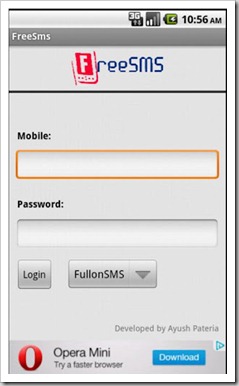
Free SMS
Free SMS to India is an Android app that allows users to send free and unlimited text messages to any mobile in India directly from an Android phone. This app gives you the advantage to use multiple gateways like Way2SMS, FullonSMS, Site2SMS, 160by2 and YouMint. The developer is also open to being contacted to add more gateways.
The interface is simple and Free SMS also allows you to choose from the huge library of sample texts for different occasions that you may be sending messages for. What seems like icing on the cake is the developer’s claim that this app saves battery life and RAM as it transfers the processing and operations to external servers.

JaxtrSMS

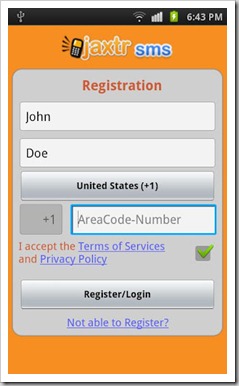
Jaxtr SMS
Launched in November 2011, JaxtrSMS allows users to send unlimited and free text messages to any phone anywhere in the world. The SMS recipients are not required to install the app before using it. This makes it the world’s first mobile based SMS app which is completely open, claims Sabeer Bhatia who is the CEO and Co-Founder of Jaxtr, TOI reported. Amongst a host of free SMS services, this ‘open’ feature of JaxtrSMS gives it an edge over other SMS apps. According to Bhatia, this ad supported multi-platform app will make traditional texting redundant.
Hope you like our list of 5 free sms apps for android users in India. If you are using any other apps than those mentioned here, do share their names and your experiences with those apps with our readers by writing to us.